Best Event & Wedding Planning Tools in 2026 (And Where Each One Falls Short)
28 July 2026 · 7 min read

Every planner running multiple weddings or events at once eventually goes looking for a tool to fix the vendor chaos. Most of what's out there solves a real problem, just usually a narrower one than the marketing suggests. Here's what each category actually does well, and where it stops.
Shared calendars and spreadsheet trackers
A shared Google Calendar or a color-coded spreadsheet is the most common starting point, and for good reason: everyone on the team can see the same dates, and it costs nothing to set up. The gap is that a calendar or spreadsheet only holds what someone already typed into it. A caterer's email about a final headcount, a florist's text about a delivery window change, a contract with a deposit due date buried on page three: none of that becomes a tracked item until someone reads it, decides it matters, and manually enters it. The tracker is accurate only as far as someone's willing to keep typing into it.
CRM and proposal tools repurposed for coordination
HoneyBook and Dubsado are built for client-facing workflow, proposals, contracts, invoicing, and are adapted for day-to-day coordination by bolting on task lists. They're genuinely good at what they're built for: keeping the client relationship and paperwork organized. What they don't do is help you get information out of an inbound vendor email in the first place. You're still the one reading the message and deciding it needs to become a task.
Dedicated wedding and event planning apps
Aisle Planner and Planning Pod go further: seating charts, budget tracking, vendor directories, timeline builders. They're built specifically for event logistics, which makes them richer than a generic calendar. The tradeoff is the same one: someone still has to read the incoming vendor email and manually enter it into the app's format. More features doesn't remove the retyping step, it just gives the retyped information more places to go.
Vendor group chats and manual retyping
The most common system isn't an app at all: someone reads every vendor email and text and either remembers it, retypes it into whatever tool the studio uses, or forwards it to themselves and hopes to deal with it later. This works until it doesn't. It depends entirely on one person's attention, and it fails exactly the way you'd expect: something gets missed during a busy week, or the one person doing all the reading burns out and nobody else even knows what they were tracking across a dozen concurrent events.
Forward-and-extract tools
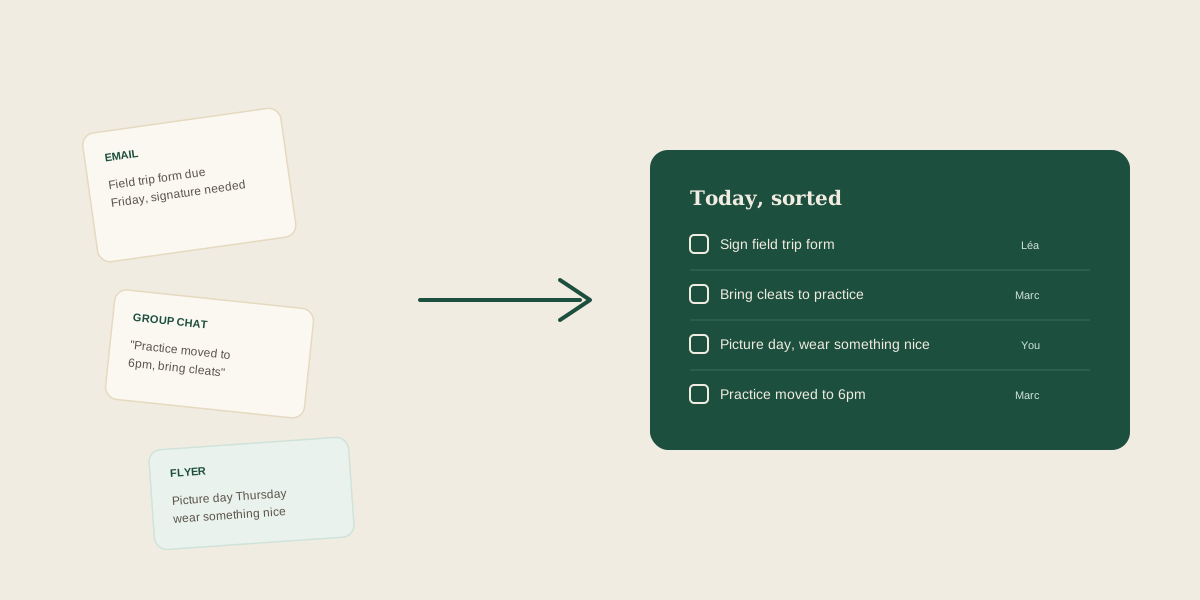
A newer category skips the retyping step entirely: forward the original message exactly as it arrived, and the tool reads it and pulls out what's actually actionable. This is the category Glaard is built for. You don't summarize the vendor email yourself or decide what counts as a task; you forward it, and a deposit deadline, a headcount request, or a delivery window gets extracted and placed on a shared board your team can see and divide up. It doesn't replace a CRM or a timeline builder. It solves the step before those tools even become useful: getting the information out of your inbox and into a shared place without you doing the manual work every time.
How to choose
If your studio's problem is mostly about seeing the same dates, a shared calendar is enough. If you already read everything and just need somewhere to check things off, a CRM task list works fine. If the real bottleneck is that one person has to read every vendor email, every contract, and every text before anything makes it onto a shared board at all, that's specifically the gap a forward-and-extract tool is built to close.
Frequently asked questions
Do I need to replace my CRM to use a tool like this?
No. Forward-and-extract tools like Glaard sit before your CRM in the process: they turn a messy forwarded vendor email into a clear task, which you can still track on whatever CRM or timeline tool your studio already uses.
What's the difference between a planning app and a forward-and-extract tool?
A planning app (timelines, seating charts, budgets) gives you somewhere to put information once you've already decided what matters. A forward-and-extract tool handles the step before that: reading the original vendor message and pulling out what's actually actionable, so you're not the one deciding and retyping every time.
Why do shared calendars still cause one person to end up doing all the tracking?
Because a calendar only contains what someone manually entered into it. If reading every vendor email and contract falls to one planner, the calendar reflects that person's attention, not the studio's actual workload, and everyone else is still dependent on them noticing and typing it in.
Is a forward-and-extract tool overkill if I only run one or two events a month?
Probably, if your studio already keeps up fine with a shared calendar. It's built for studios where the volume (multiple concurrent events, dozens of vendors) makes manual reading and retyping the actual bottleneck, not for occasional single events.
Get your studio address, free
Get your studio address
