How to Pull Real Tasks Out of Vendor Group Chats (Without Reading Every Message)
3 August 2026 · 6 min read

Email at least arrives one message at a time, with a subject line and a sender you can identify. A vendor group text or a shared planning app thread is a different kind of problem: several vendors and coordinators share one thread, replies pile on top of the message that actually mattered, and the important line about a delivery-time change ends up buried under a handful of "sounds good" and "confirmed, thanks." Scrolling back to find it later is its own chore, and it's one more input on top of the vendor emails and contracts a studio is already trying to keep straight.
Why group chats are worse than email
A single email at least stays where it landed until you deal with it. A group chat keeps moving. The message about the florist's delivery window moving to 9am scrolls off the screen the moment two people reply with a thumbs up, and by the time you notice, it's already twenty messages back, mixed in with a question about parking and a photo from a site visit. Email at least has structure: a sender, a subject line, an unread count. A group chat is one long, undifferentiated stream that treats a schedule change exactly the same as small talk.
The scroll-back problem
The scroll-back problem shows up at the worst possible moment: someone half remembers that the delivery window changed, but not to what, and not who said it, so they end up scrolling through a hundred messages looking for the one that matters, on the morning of the event, from a phone, while a vendor is asking why nobody's at the loading dock. Bookmarking a message in the moment is possible in most apps, but it requires noticing it matters and acting immediately, which is the same problem a busy planner already has with email. The chat doesn't get less noisy just because you're now the one responsible for catching everything in real time.
What's actually worth tracking in a vendor chat
Most of a vendor group chat is genuinely just chatter: logistics questions already answered, confirmations, thanks, a photo from a walkthrough. Buried inside that is a small number of messages that actually change something: a delivery time, a location detail, a deposit reminder, something to confirm, a cancellation. The skill studios end up building by necessity is a kind of triage, learning to skim past the noise and catch the handful of messages that matter, which works fine until the week gets busy and the skimming stops happening reliably.
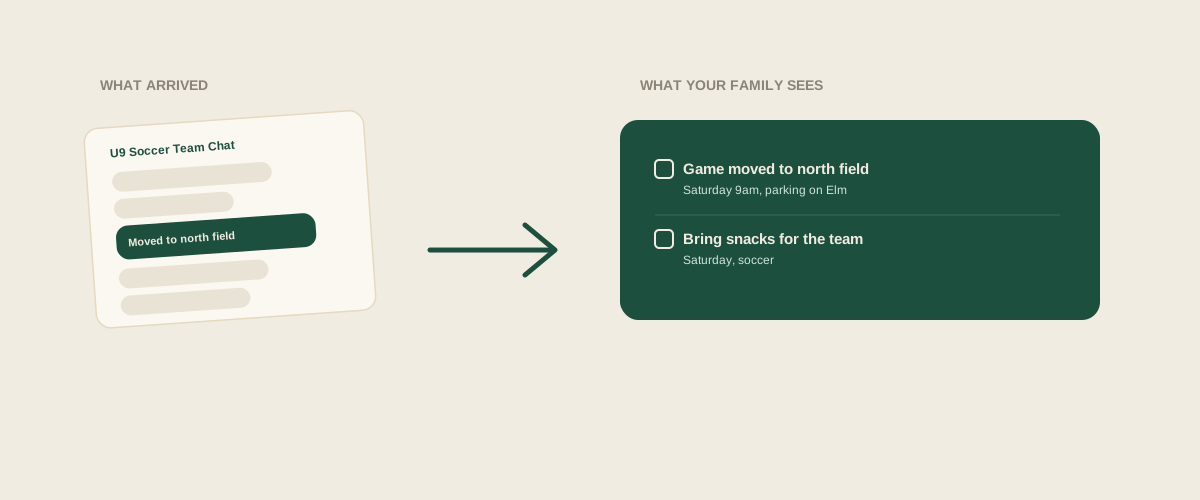
A worked example
A typical vendor thread might run: "Reminder delivery is 9am Saturday," then a dozen replies of thanks and thumbs up, then someone asks, "is it the usual loading dock?", then the florist replies, "no, moved to the side entrance, parking is on Elm this time," then more replies, then someone posts an unrelated photo from last week's setup. Everything a planner actually needs (the time, the changed location, the parking note) is real information sitting inside that thread, just surrounded by forty messages that aren't. Forwarding or screenshotting the florist's two relevant messages and letting them get pulled into a single task, delivery Saturday 9am, side entrance, park on Elm, turns that scroll into one line on a shared board instead of something that has to be found again from memory.
Common mistakes
Trying to read every message as it arrives, which works until a busy week makes that impossible and the chat becomes a backlog nobody wants to open. Muting the chat entirely to escape the noise, which solves the volume problem by also losing the two messages a week that actually matter. Relying on one coordinator to be the one who reads the vendor chat because they happen to have the app open most, which quietly recreates the same single point of failure a shared tracker has when only one person fills it in.
Where to start
The fix isn't reading the group chat more carefully or more often, it's treating it the same way as a vendor email: when a message actually matters, whoever saw it forwards or screenshots that specific message, and it becomes a task on a shared board rather than something buried thirty messages deep that someone has to remember to go find later. The noise in the chat stays exactly where it is. What changes is that the two messages a week worth acting on stop depending on anyone's memory of where they were in a long scroll.
Frequently asked questions
Do I need to forward every message in a vendor chat, or just the ones that matter?
Just the ones that matter. A delivery time change, a location switch, or a deposit reminder is worth forwarding. The daily chatter, confirmations, thanks, photos, does not need to go anywhere.
What if I do not notice the important message until days later, buried in the chat?
You can still scroll back and forward it whenever you find it. It is later than ideal, but forwarding a late message is still faster than trying to reconstruct every detail from memory once the chat has moved on.
Does this work for both group texts and shared planning app threads?
Yes. Any message you can screenshot or forward works the same way, whether it came from a group text, a shared planning app, or a vendor portal message. The format of the source does not matter, what matters is capturing the actual message once it is clear it is worth acting on.
How is this different from just pinning or bookmarking the message in the chat app itself?
Pinning keeps the message inside that one chat, which still means checking that specific app to see what is pinned. Turning it into a task on a shared studio board means everyone can see it in the same place as everything else that needs doing, not scattered across a different pinned list in every vendor chat the studio is part of.
Get your studio address, free
Get your studio address
