How to Keep a Shared Vendor Board Useful Instead of Another Place Nobody Checks
15 October 2026 · 6 min read
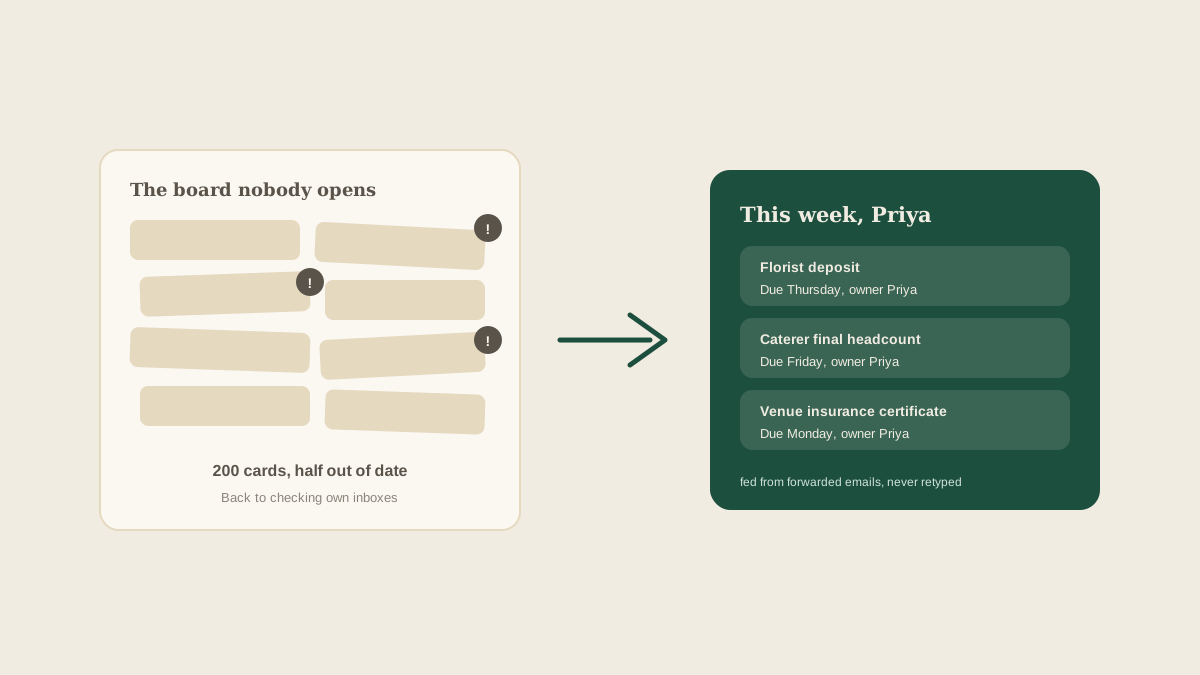
Every studio that adopts a shared board goes through the same arc. In week one it is exciting, everything is on it, and the team feels relief. By week six there are two hundred cards, half of them out of date, and the coordinators have quietly gone back to checking their own inboxes. The board did not fail because the idea was wrong. It failed because nobody decided what it was for.
A shared board only works if the team trusts it more than their own memory. Trust comes from the board being current, small enough to scan and obvious about what needs attention today. Here is how to build those three qualities in from the start.
Decide what belongs on the board
The fastest way to ruin a board is to put everything on it. Vendor tasks, client wishes, mood board links, your own reminder to buy ribbon. When every item carries the same weight, none of them stands out.
A useful rule: a card belongs on the board if it has a vendor, a deadline and an owner. A deposit due on the 12th, the final headcount owed to the caterer, a certificate of insurance the venue needs. Anything that is only an idea, a preference or a link belongs in a notes field on the wedding, not as its own card.
That one filter usually cuts the card count by a third, and the cards that remain are the ones that cost money or goodwill when they are missed.
Give every card exactly one owner
A card assigned to "the team" is assigned to no one. When two coordinators both see an unanswered vendor question, each assumes the other will deal with it. Name one person on every card, even when the work is shared, and let that person hand it off explicitly.
This also changes how the board feels to use. When you open it, you can filter to your own name and see exactly what is yours today. A board that answers "what do I do next?" in five seconds gets opened. A board that makes you hunt does not.
Feed it automatically wherever you can
The biggest cause of stale boards is manual entry. Someone has to read the vendor email, find the date, open the board and type it in. On a busy Friday that step is the first thing dropped, and the board quietly falls a day behind reality, then a week.
This is the problem Glaard is built around. Forward the vendor email, the contract or the venue's welcome message to your studio address and the deposit dates, delivery windows and requests are pulled out as tasks on the right wedding, with the original message linked. Nobody retypes anything, so the board stays current without anyone having to be disciplined about it.
Run a ten-minute weekly sweep
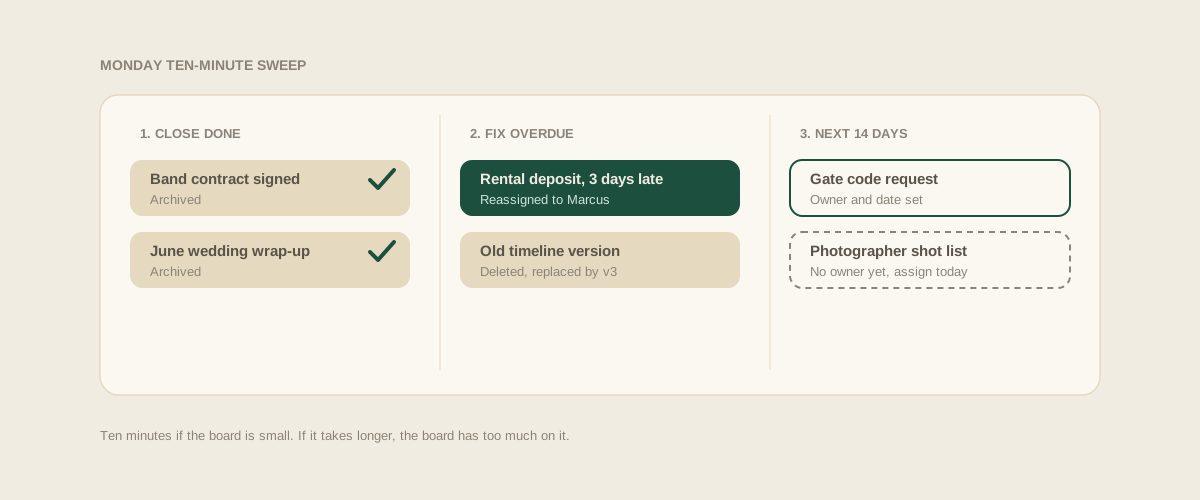
Even a well-fed board drifts. Cards finish and nobody closes them, dates change and the old one lingers, a vendor drops out and their tasks sit there. A short weekly sweep keeps this from compounding.
Pick a fixed time, such as Monday morning, and go through three passes. First, close anything that is done. Second, look at everything overdue and either do it, move it with a reason or delete it. Third, scan the next fourteen days for cards that have no owner or no date. Ten minutes is enough if the board is small, and if it takes longer, that is a sign the board has too much on it.
Make overdue loud and everything else quiet
Notification overload kills boards as surely as stale data does. If every comment, edit and reassignment sends an alert, people mute everything, including the alert that matters. Aim for the opposite: very few signals, each one important.
In practice that means three things get a nudge. A task due within the next two days, a task that has gone overdue, and a vendor reply that arrived and needs a decision. Everything else can wait for someone to open the board. The goal is that when the board does speak up, people listen.
Let the board answer the questions people keep asking
Notice what questions your team asks you repeatedly. "Did the florist confirm?" "Has the deposit gone out?" "Who is covering the rehearsal?" Each of those is a missing view. If the answer lives in your head, the board is not yet doing its job.
Add a simple way to see each wedding's open items, each vendor's status and each coordinator's week. When people stop interrupting you with status questions, you know the board has earned its place.
Retire what is finished
After a wedding, archive its cards and keep the notes. A board that still shows last season's events looks busy and makes the current work harder to see. Archiving is not deleting, because you may want the history when a vendor is rebooked, but it keeps the active view honest.
Where to start
Open your current board or inbox and count the items that have a vendor, a deadline and an owner. Cut or move the rest, assign a single name to every remaining card, and set a recurring ten-minute sweep for Monday. That alone often turns a board nobody checks into the first thing the team opens.
Frequently asked questions
How many cards is too many on a shared board?
There is no fixed number, but if a coordinator cannot scan their own cards in under a minute, there are too many. Filtering to a single owner and the next fourteen days should leave a short, readable list.
Why does our team keep going back to their own inboxes?
Usually because the board is behind the inbox. If a new vendor email takes longer to enter than to just remember, people skip the board. Feeding it automatically from forwarded emails removes that gap.
Should clients see the shared board?
Most studios keep the working board internal and share a trimmed status view with clients. Internal cards often include candid notes about vendors that are not meant for the couple.
What should happen to old cards after a wedding?
Archive the cards and keep the notes. You get a clean active view, and the history is still there if you rebook the same vendors or need to settle a question about what was agreed.
Get your studio address, free
Get your studio address
