4 Ways Studios Build a Starting Task List for Each New Wedding (And Where the Template Goes Stale)
29 October 2026 · 6 min read
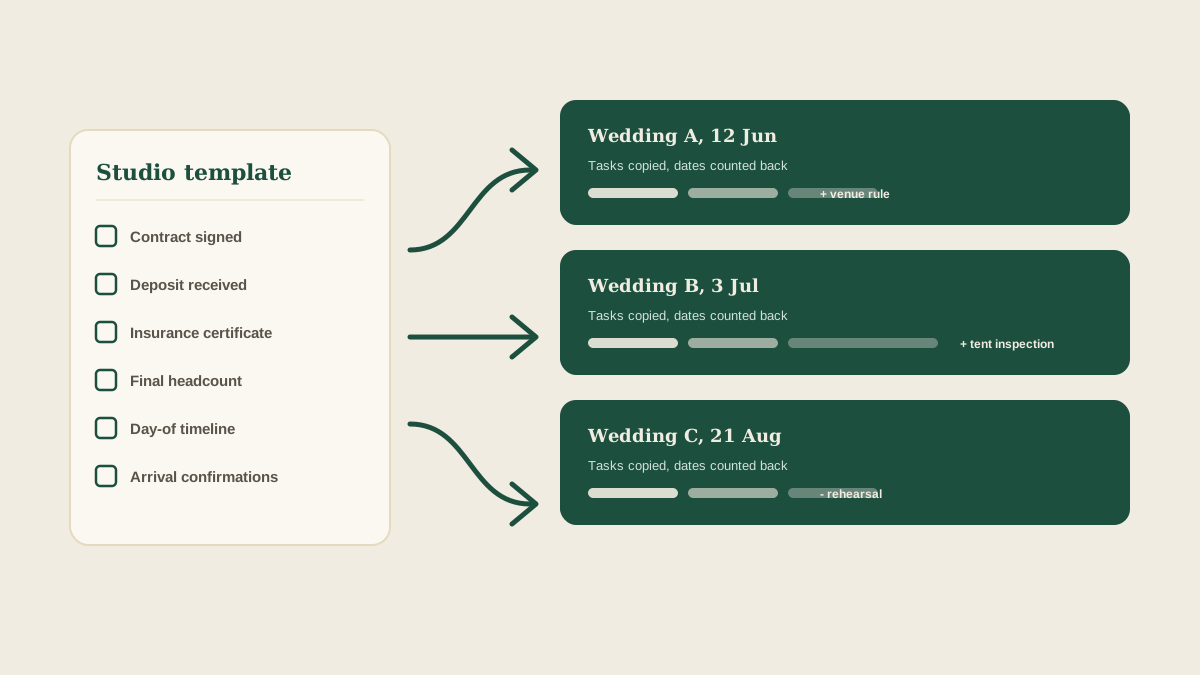
A new wedding is booked, and the planner opens a blank page. Contract, deposit, venue walkthrough, vendor confirmations, final headcount, timeline, rehearsal. Most of this list is the same as last month's wedding and the one before that. And yet each studio rebuilds it from memory, which is how the one task that is easy to forget, such as the vendor insurance certificate, goes missing on wedding number nine.
A starting task list makes sense, and nearly every studio tries one. The problem is not whether to have a template. It is how the template is kept, copied and updated. Here are four common approaches and where each one goes stale.
1. A checklist in a document
The most common version is a long document or spreadsheet the planner copies for each wedding. It is easy to build and everyone understands it.
It breaks in two places. First, the dates. A checklist that says order rentals eight weeks out does not know the wedding date, so someone has to calculate every deadline by hand, and the calculation gets skipped when things are busy. Second, the copy drifts. Each wedding's copy is edited, and the improvements (a new step for the venue's loading rules, say) stay in that one copy and never make it back to the master.
2. The previous wedding as the template
Many planners skip the master and simply duplicate the last wedding. The appeal is that it reflects how the studio worked most recently, and it is already filled in with realistic vendors and timing.
The risk is inheritance. Details from the last couple's wedding carry over: a vendor name, a note about a dietary need, a deadline that was specific to that venue. A cleanup pass is supposed to remove them, and it is exactly the kind of chore that gets cut short. A stray line from a previous client is both an error and an awkward conversation.
3. A project management template
Some studios use a general task tool and build a wedding template inside it. It handles assignment and due dates well, and a good one can set deadlines relative to the event date.
Where it falls short is the input side. The template creates the empty tasks, but the actual information still arrives by email, text and photo. Someone has to read each message and update the right task on the right board, which is the same retyping the template was supposed to save. Over a busy season, the board and the inbox drift apart.
4. A shared board that starts from a template and fills itself in
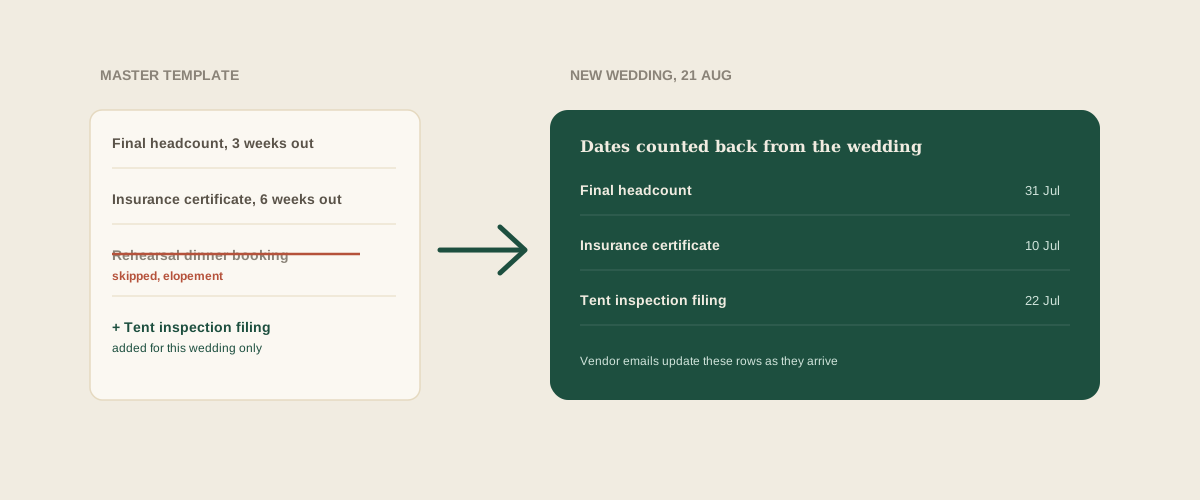
The fourth approach separates the two jobs: a template that sets up the structure, and a flow that keeps it up to date. The structure covers the standard tasks, owners and deadlines counted back from the wedding date. The flow turns what actually arrives into updates.
Glaard works this way. A new wedding starts with your studio's standard tasks, with due dates calculated from the event date. After that, you forward vendor emails, contracts and client texts to your studio address, and Glaard reads them, works out which wedding they belong to, and updates the matching tasks or adds new ones, with the original message attached. The template covers what you always do. The forwarded messages cover what is different this time.
What to look for in any template
Whichever method you use, a few features separate a template that helps from one that quietly misleads. Look for relative deadlines, so dates come from the wedding date and not from memory. Look for a clear owner role on each task (lead planner or coordinator), so assignments are not guessed each time. Look for a way to improve the master, so lessons from one wedding reach the next. And look for a way to remove or skip tasks without deleting them silently, so an unneeded step is visible as skipped, not forgotten.
Keep the template short on purpose
A template with 140 tasks becomes a template nobody trusts. Start with the tasks that are the same across nearly every wedding and that cause real damage when missed: contracts, deposits, insurance certificates, final counts, the day-of timeline, the arrival confirmations. Add specifics, such as a tent inspection, only when a wedding needs them.
A short template that is accurate beats a long one that people skim. If the team is deleting more than a quarter of the tasks on each new wedding, the template is too long.
Update the master after every wedding
The cheapest habit is also the one that gets skipped. At the end of each wedding, ask one question: what did we add or change that the next wedding should start with? Add it to the master that week. Without it, every improvement stays in one wedding and is relearned the next time.
Where to start
Pull up the last three weddings and list the tasks that appeared on all three. That list is your first template. Give each task a role and a deadline counted back from the wedding date, then use it for the next booking and note what you add. After a few weddings, the template reflects how your studio really works.
Frequently asked questions
How long should a wedding task template be?
Short enough that people trust it. Start with the tasks that appear on nearly every wedding and cause real damage when missed, such as contracts, deposits, insurance certificates, final counts and the day-of timeline. If the team deletes more than a quarter of the tasks each time, trim the template.
Is duplicating the last wedding a good way to start?
It works for structure, but it carries over details from the previous couple, such as vendor names, notes and venue-specific deadlines. If you use it, run a cleanup pass before anyone sees the new board, or start from a clean master instead.
How should deadlines be set in a template?
Count them back from the wedding date, for example final headcount three weeks out, so the due dates are calculated for each event and not copied from the last one.
How does Glaard help with starting task lists?
A new wedding starts from your studio's standard tasks with due dates counted from the event date. Then you forward vendor emails, contracts and client texts to your studio address, and Glaard updates the matching tasks or adds new ones, with the original message attached.
Get your studio address, free
Get your studio address
