How to Get Seating Chart Changes to the Caterer, Rentals and Stationer Without Sending Three Different Versions
22 October 2026 · 6 min read
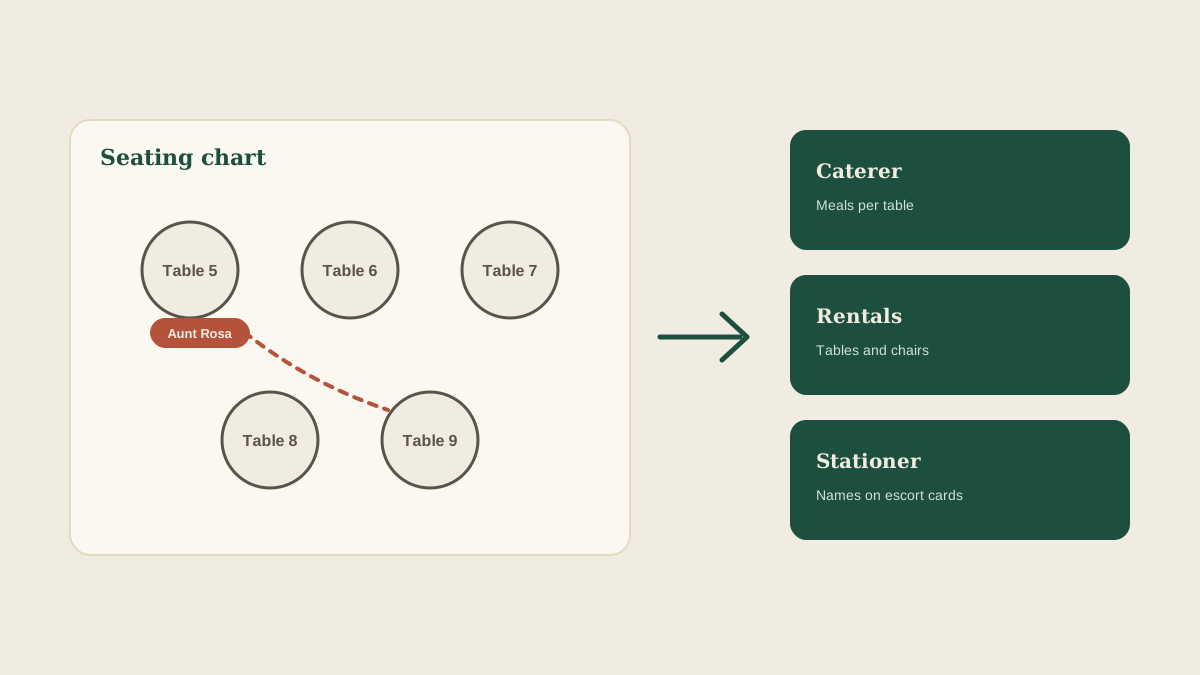
The seating chart is never finished. A guest drops out, a plus-one is added, two relatives stop speaking, and a table of eight becomes a table of nine. Each of those changes is small. The trouble is that the chart is not just a planning document. It is an input for the caterer, the rental company, the stationer who printed the escort cards, and often the venue's own floor plan.
When the chart changes, all of them need to know. In practice the planner updates a spreadsheet, texts the caterer, emails the rental company a day later, and forgets the stationer entirely. Then the wedding day arrives and the place cards say one thing, the chairs say another, and the kitchen is plating a vegetarian meal at a table where nobody ordered one.
Here is how to keep one current version and make sure the right vendor gets each change on time.
Know who actually depends on the chart
Before fixing the process, list who uses which part of the chart. They do not all need the same thing.
The caterer needs table counts and meal selections per table, because that is how plates are grouped and served. The rental company needs the number of tables, their sizes and the chair count, which can change even when the guest count does not (a table of ten instead of eight means a different table). The stationer needs names and table numbers for escort cards or a seating display, and has a print deadline after which a change costs money. The venue may need the final layout to approve the fire exits and aisle widths.
Write this down once per wedding. A short note saying who needs what, and by when, is more useful than any template, because it tells you which changes matter to which vendor.
Decide what counts as a change worth sending
Not every edit needs to go out immediately. Swapping two guests between tables of the same size and the same menu choices changes nothing for the caterer or the rental company. It does change the stationer's print file, if the cards are not yet printed.
A useful rule is to separate changes by what they affect. Changes to a table's size or count go to the rental company. Changes to the number of meals at a table, or to special meals, go to the caterer. Changes to a name or a table number go to the stationer until the print deadline, and to the day-of team afterward. Naming the type of change makes it obvious who to tell.
Keep one source of truth
The most common failure is two versions of the chart in circulation. The client sends a revised PDF, the planner edits the spreadsheet, and the stationer still has the first export. Nobody is being careless. There is simply no single place that says which version is current.
Pick one, and name it. It might be the shared spreadsheet or a dated PDF. Every change is made there first, and every vendor message points to it, so the question is never which one is right, only which date is the latest.
Turn each change into tasks with owners
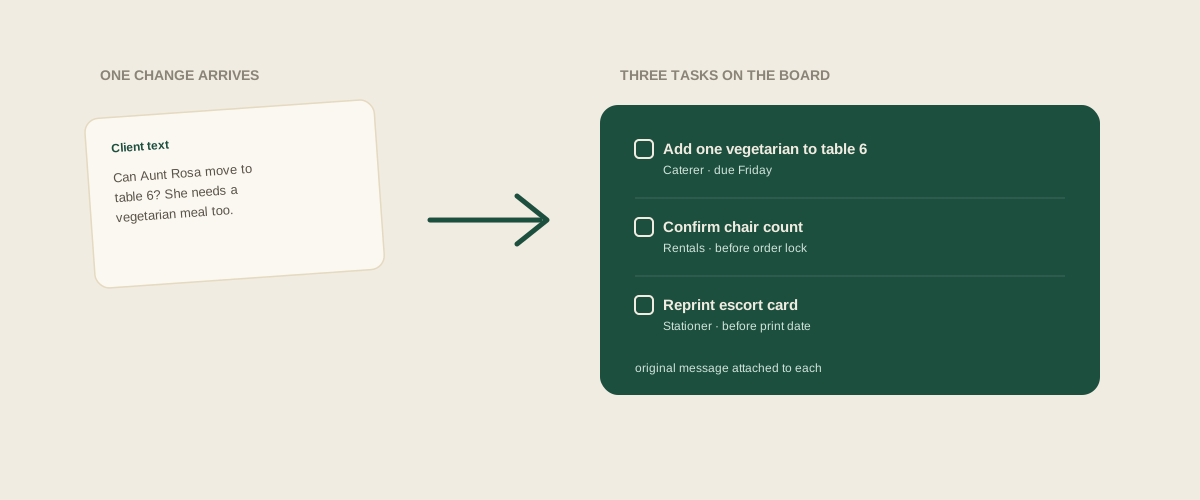
A seating change is really several small jobs. Tell the caterer table six now has one more vegetarian. Ask the rental company whether chairs are still correct. Check whether the escort card for the moved guest has been printed. If those jobs live in one person's memory, one of them gets dropped.
Glaard is built for this step. Forward the client's email, text screenshot or revised chart to your studio address, and Glaard reads it, works out which wedding it belongs to, and creates a task for each vendor affected, with the original message attached. The coordinator sees update vegetarian count for the caterer and confirm chair count with rentals as separate lines with owners and due dates, rather than one vague note to update the seating.
Respect each vendor's cutoff
Every vendor has a point after which a change is harder or more expensive. The stationer's is the print date. The caterer's is usually the final headcount deadline. The rental company's is the order lock, often a week or two out.
Put those dates on the board as tasks at the start, not when the first change arrives. Then, when the client sends a change after a cutoff, you know immediately that it is a conversation about cost or a workaround (a handwritten card, a reprinted sign) and not a quiet edit.
Ask for a written confirmation back
A vendor saying okay in a text is not the same as a vendor confirming the new numbers. Ask for the specific figures back: "Confirming 12 tables of 8 and 2 tables of 10, 136 chairs total." Forward that reply to the studio address so the task is marked done with the evidence attached.
If the wedding day arrives and the count is off, that confirmation tells you whose side the error is on, and it is what your day-of coordinator can read if they were not part of the thread.
Run a final check against the printed or delivered result
The last step takes five minutes and catches the most. In the week before the wedding, compare the final chart to what each vendor says they are preparing. Does the caterer's table list match? Does the rental count match? Do the escort cards match the latest names?
Make it a recurring task on the board with a date, rather than something you do if you remember. Last-minute swaps tend to arrive in the final days, and that is exactly when it is easy to assume everything was already updated.
Where to start
Pick the next wedding with a seating chart in progress. List which vendors depend on it and their cutoff dates, name the one current version, and set up a task for each vendor affected by the next change. Once that is in place, a late seating swap becomes a handful of clear tasks instead of a scramble.
Frequently asked questions
Which vendors need to know when the seating chart changes?
Usually the caterer (meal counts per table), the rental company (table and chair counts), the stationer (names and table numbers on cards or signs), and sometimes the venue (layout approval). Each cares about a different part of the change.
How do we avoid two versions of the chart circulating?
Name one current version, such as a shared spreadsheet or a dated PDF, make every change there first, and have every vendor message refer to it by date. Old exports should be marked as replaced.
What if the client changes the chart after the stationer's print deadline?
Treat it as a conversation about cost or a workaround, such as a reprint of the affected cards or a handwritten replacement. Put it on the board as a task so the decision and who approves it are recorded.
How does Glaard help with seating chart changes?
Forward the client's revised chart or message to your studio address. Glaard reads it and creates a task for each affected vendor on the wedding's shared board, with the original message attached and a due date based on the vendor's cutoff.
Get your studio address, free
Get your studio address
