How to Track Vendor Power, Equipment and Space Requirements Before They Collide at the Venue
22 October 2026 · 6 min read
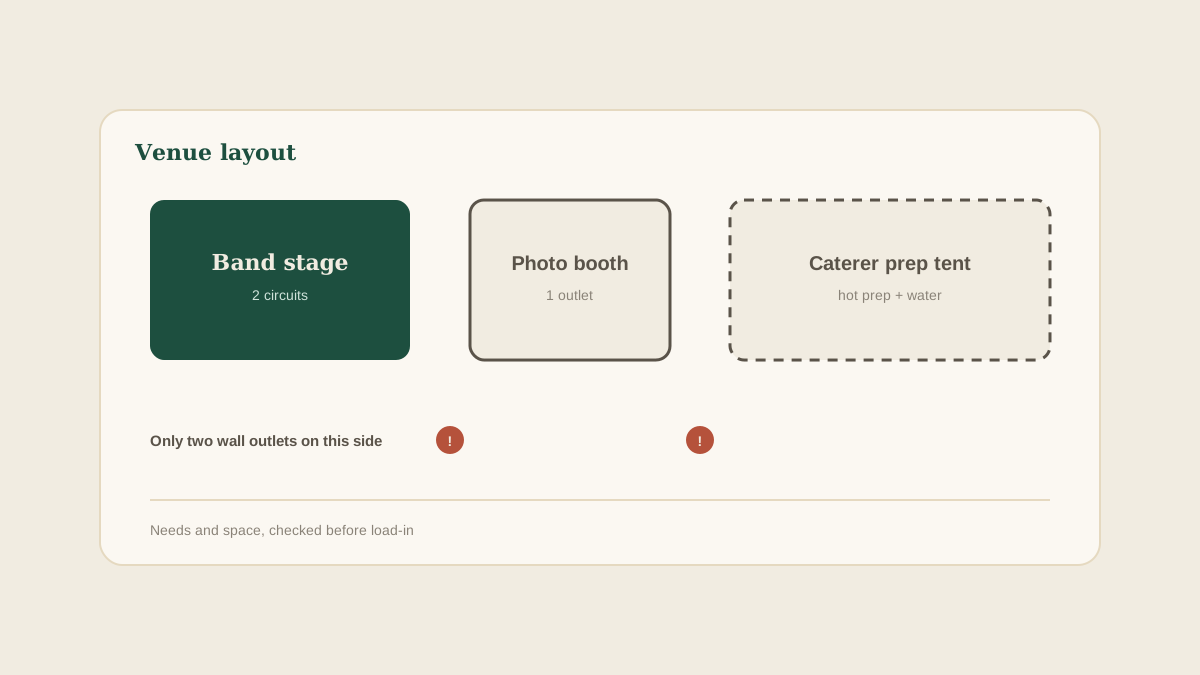
Most vendor problems on the wedding day are not about quality. They are about logistics nobody checked. The band arrives and needs two separate circuits. The photo booth needs an outlet within ten feet of where the couple wants it. The caterer's tent needs space the lighting company has already claimed. None of this is surprising in hindsight, and all of it was knowable weeks earlier.
The reason it gets missed is that each vendor mentions their requirements in a different place. The band's rider is a PDF attached to the contract. The photo booth company put it in one line of an email. The caterer said it on a phone call. The venue's capacity sits in a different document altogether. Nobody is holding all of them at once.
Here is how to gather every vendor's technical needs, compare them with the venue, and fix conflicts while they are still easy to fix.
Ask every vendor the same four questions
The simplest improvement is consistency. For each vendor who brings equipment, ask the same questions: How much power do you need, and does it need to be a dedicated circuit? What space do you need, in dimensions, for setup and during the event? When can you load in, and how long do you need? What do you need from the venue that you do not bring yourself, such as tables, water, shade or a loading path?
Put the questions in your first email after booking. It takes two minutes and produces answers in a form you can compare, instead of a different story from every vendor.
Collect the venue's side of the equation
The venue is the other half. Ask for the number and location of outlets, the amperage of each circuit, any restrictions on generators or open flames, ceiling height and rigging rules, and any areas that are off limits to equipment.
Venues often have a technical sheet or a venue manager who can answer this in one email. Ask early, because the answer sometimes changes the vendor list. A tent with no power may mean a rental generator, which is a new line in the budget and a new delivery to coordinate.
Lay the requirements side by side
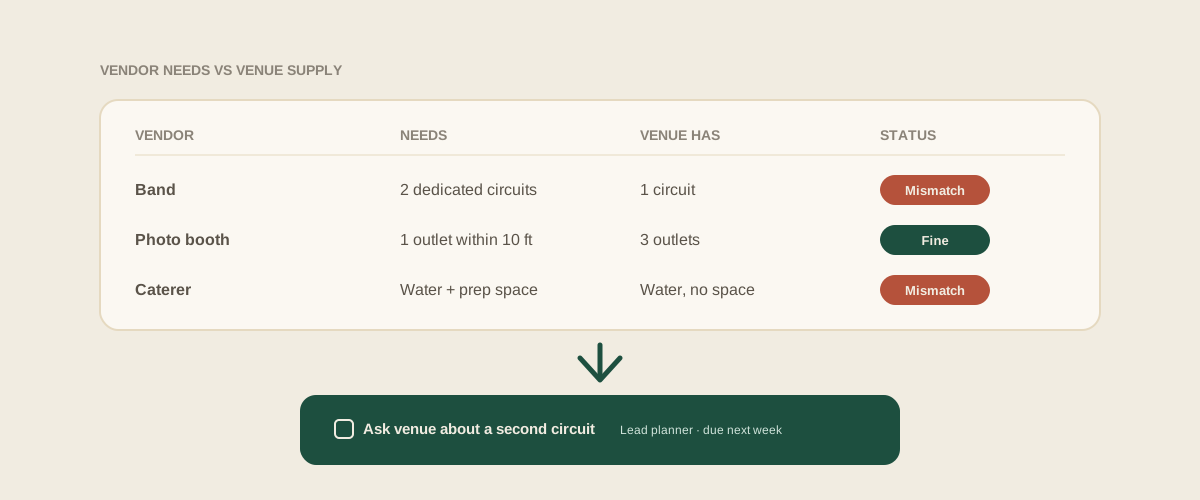
Once you have both sides, put them in one place. A simple table works: vendor, power needed, space needed, load-in window, and what the venue must provide. Add a column for what the venue says it can supply.
This is where conflicts become visible. Two vendors that each want the same single outlet. A stage that needs more floor space than the layout allows. A load-in window that overlaps with another vendor's setup. Every one of those is a problem you would otherwise discover in the middle of the setup, with guests arriving in two hours.
Turn each mismatch into a task
A mismatch is only useful if it is acted on. Each one should become a task with an owner and a date: ask the venue about a second circuit, confirm with the band whether they can run on one, order a generator, move the booth. Do not leave it as a note saying power might be an issue.
Glaard handles this well when the requirements arrive in messy forms. Forward the band's rider, the photo booth's email and the venue's technical sheet to your studio address. Glaard reads them, works out which wedding they belong to, and creates tasks such as confirm second circuit with venue and confirm booth outlet location, each with the original message attached. The coordinator sees the open questions on the shared board, not buried in four separate threads.
Include the unglamorous needs
Power gets the attention, but plenty of last-minute scrambles come from smaller items. Extension cords and cable covers. Table linens for a vendor table. Shade for a DJ in a summer garden. A key to a locked service entrance. A trash and recycling plan for the caterer.
Ask each vendor what they would normally expect the venue to have on site, and what they usually bring. If the answers do not match, the gap is a task. Putting small items on the board feels excessive until the day a vendor spends forty minutes hunting for a power strip.
Confirm in writing after any change
Requirements move as the plan moves. A bigger band, an added lighting package, or a changed ceremony location all change the needs. When that happens, send the affected vendor and the venue the updated numbers and ask for written confirmation.
Forward the replies to the studio address so the matching task is marked done with the confirmation attached. That reply is what your day-of coordinator reads if the question comes up on site.
Do a walk-through with the list in hand
If the venue allows a site visit, bring the requirements table and check each item against the actual space. Photograph the outlets and note where they are. Measure the stage area.
Add the photos to the wedding's board so vendors and the day-of team see the real layout. A picture of the only outlet in the room is worth a lot more than a sentence saying power is limited.
Where to start
Choose the next wedding on your calendar with a band, DJ, photo booth, or any vendor that brings equipment. Send the four questions to each of them this week, ask the venue for its technical details, and put the answers in one table. Any mismatch you find now is a small task, not a wedding-day emergency.
Frequently asked questions
When should we ask vendors about power and equipment needs?
As soon as they are booked. Early answers leave time to talk to the venue, order a generator, or adjust the layout. Asking in the final week leaves very little room to fix a conflict.
What should be on a vendor's technical requirements list?
Power, including whether a dedicated circuit is needed, the floor or table space they need, the load-in window and setup time, and anything they expect the venue to provide, such as tables, water or shade.
What if the venue cannot meet a vendor's power needs?
Make it a task with an owner. Options include a rental generator, a different setup location, or asking the vendor if they can scale down. Whatever you choose, get the decision confirmed in writing by both the vendor and the venue.
How does Glaard help track vendor equipment requirements?
Forward each vendor's rider or email and the venue's technical sheet to your studio address. Glaard reads them and creates tasks for the open questions on the wedding's shared board, with the original messages attached so the team sees the actual wording.
Get your studio address, free
Get your studio address
