How to Track Rental Pickups and Returns So Nothing Comes Back Late or Never Comes Back
8 October 2026 · 6 min read
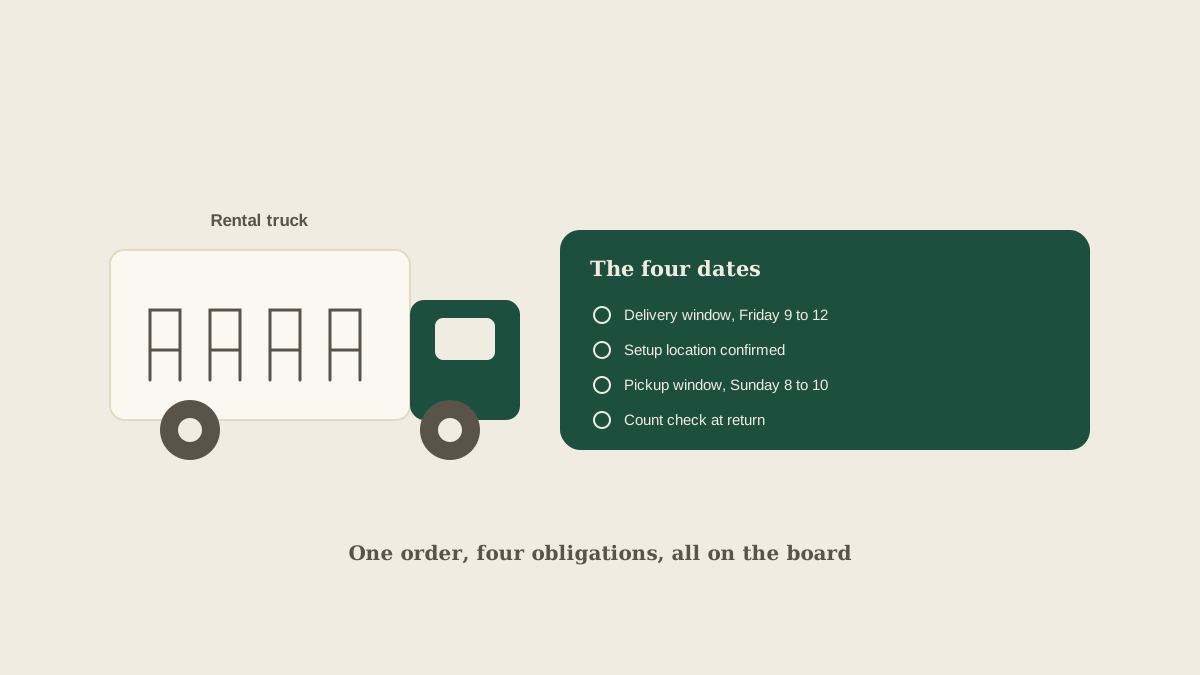
Rentals are the part of a wedding that everyone forgets until it is a problem. The chairs arrive, the linens go on the tables, and the event happens. Then it is Sunday morning, the venue needs the room cleared by 10, and nobody is sure whether the rental company's truck is coming at 9 or at noon.
Unlike a caterer or a band, rental vendors work on windows and counts. They deliver within a range, pick up within a range, and charge for anything that is late, short, or damaged. That makes them easy to lose track of, because the work is spread across several dates and several emails. Here is how to keep it together.
Why rentals slip through
A rental order creates at least four separate obligations: a delivery window, a setup deadline, a pickup window, and a count check at return. They are usually described in different messages. The delivery window is in the order confirmation, the pickup window comes in an email a week before, and the final count is agreed in a phone call.
Add the venue, which has its own load-in and load-out rules, and a client who may have rented some items separately, and it is easy for pickup to fall into a gap. Nobody owns it, because everyone assumes the rental company or the venue is handling it.
Put every rental date on the board at order time
The first fix is to record all four obligations as soon as the order is confirmed, rather than one at a time as they come up. Forward the confirmation to the studio's shared address, and Glaard pulls out the dates and creates tasks on the board: delivery window, confirm setup location, confirm pickup window, and count check on return. Each one has the event named and an owner.
Doing this at order time matters because the pickup window is the one that is usually missing from the first email. A task that says "confirm pickup window with the rental company" two weeks out turns a missing detail into a visible to-do, instead of an unknown that surfaces on the day.
Name who is physically there
Rental deliveries and pickups fail most often because nobody is present to receive or release the items. A truck arrives at a locked venue, or the driver leaves the pile of folded chairs at the wrong door because no one told them where to go.
For each delivery and pickup, put a name and a phone number on the task: the person who will let the driver in, and the person who will sign for the count. If it is a day-of coordinator, make sure they have the rental company's dispatch number and the order reference, not just the vendor's main line.
Count at delivery, count at return
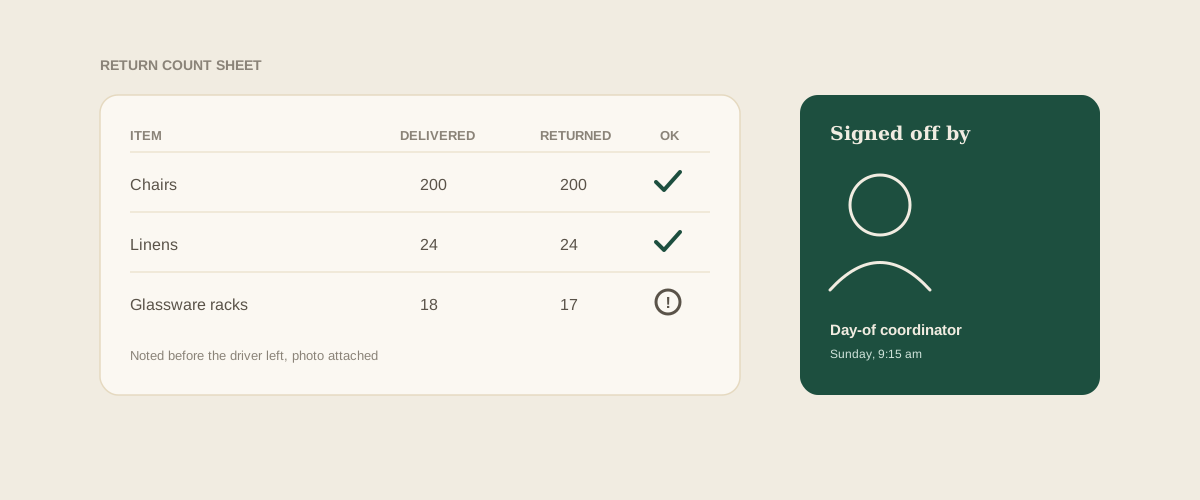
Most disputed rental charges come from counts. The invoice says 220 chairs, the studio believes it ordered 200, and nobody wrote down how many were actually delivered. Make a habit of recording the delivered count the moment the truck is unloaded, with a photo of the stack if the vendor allows it.
At return, repeat the count and note anything damaged or missing before the driver leaves. If the invoice later shows a charge for ten missing napkins, you have a dated record of what was delivered and what was handed back. Add both counts to the task so they travel with the order.
Plan the gap between the event and the pickup
Pickup windows often start early the next morning, which collides with the cleanup crew, the venue's own schedule, and the couple's gifts and belongings. Look at the sequence on the board: when does the event end, who clears the room, when can the rental company start, and who is there to hand over? If those four things do not line up, fix them before the weekend, not on Sunday morning.
If any item is going back with a different vendor, such as a florist collecting their own vases, put that on the board as a separate task, so it is not assumed to be part of the rental pickup.
Keep the rental company in the loop on changes
Guest counts and layouts move late, and rental orders move with them. When the guest count changes, the chair and linen counts change too, and the rental company's cutoff for adjusting an order is often a week or more before the event. Add that cutoff as a task when you place the order, and link any later headcount change to it, so the update reaches the rental company while it can still change the truck. A short written confirmation of the revised count protects you at return, when the invoice and your records need to agree.
Watch late fees as a deadline, not a surprise
Late return charges are usually clear in the contract and often steep. Add a task for the return deadline itself, set for the day before, so the question "has everything gone back?" is asked while there is still time to act. A rental that is still on site on the final morning is a problem you can fix. A rental that is on the invoice a month later is not.
Where to start
Pick the next event with rentals and open the order confirmation. Check whether the pickup window and the count check are written down anywhere you can find them. If not, forward the confirmation to your studio address and look at what appears on the board. Fill in the gaps by asking the vendor today, rather than the morning of.
Frequently asked questions
What should be in a rental task besides the date?
The event, the delivery or pickup window, the name and phone number of the person on site, the vendor dispatch contact, the order reference, and the agreed item counts. With those, anyone on the team can run the handoff without a briefing.
Who is responsible for a rental return if the venue is handling cleanup?
Whoever is named on the board, which should never be left as the venue by default. Confirm with the venue in writing who will meet the driver, and keep a studio person as the backup who checks that the pickup actually happened.
How do we handle items the client rented separately?
Add them to the board anyway, labeled as client-booked, with the pickup window and the contact. They are still on your event's timeline and still block the room if they are left behind.
What if the rental company changes its pickup window at the last minute?
Update the task and notify the venue and the day-of coordinator immediately. A moved pickup often collides with venue load-out rules, so ask the venue to confirm the new window too.
Get your studio address, free
Get your studio address
