How to Stop Vendors From Working Off an Old Version of the Day-Of Timeline
10 September 2026 · 6 min read

A day-of timeline is never really finished until the day itself. The ceremony start time shifts twenty minutes because the officiant has another booking, the caterer needs cocktail hour extended for a delayed sunset, the band asks for a later load-in once the venue confirms noise restrictions. Each change is small and reasonable on its own. The problem is that a timeline gets revised five or six times between booking and the wedding, and there is rarely one clean moment where everyone agrees they are now looking at the same document.
Why the timeline keeps moving
Unlike a deposit deadline or a guest count, a timeline is not one number that gets confirmed once and stays fixed. It is a document built from a dozen smaller decisions made across different conversations, sunset time from the venue, ceremony length from the officiant, a vendor's own setup requirements, a couple's late change of heart about first look photos, and every one of those inputs can shift independently right up until the week of the event. There is no single point where the timeline is done, only a point where it stops changing because the event has already started.
Why "just resend it" does not actually fix it
The instinct when a timeline changes is to send the new version out again, usually as a fresh attachment in a new email or a reply buried in an existing thread. That works for whoever opens that specific message. It does nothing for the vendor who already downloaded the previous version to their phone, printed it for their crew, or forwarded it to a subcontractor who never saw the studio's email at all. A resend reaches an inbox. It does not reach whichever version of the file someone actually opens on the morning of the wedding.
What actually collides on the day
The gap rarely shows up as a big dramatic miss, it shows up as a small mismatch that costs ten confused minutes at exactly the wrong time: the videographer arrives expecting a 4pm ceremony because that was the timeline they printed two revisions ago, while everyone else on-site is working from the 4:20 start that got confirmed the week before. Nobody did anything wrong. Each vendor was working from a document that was accurate when they got it, just not the one still in effect by the time it mattered.
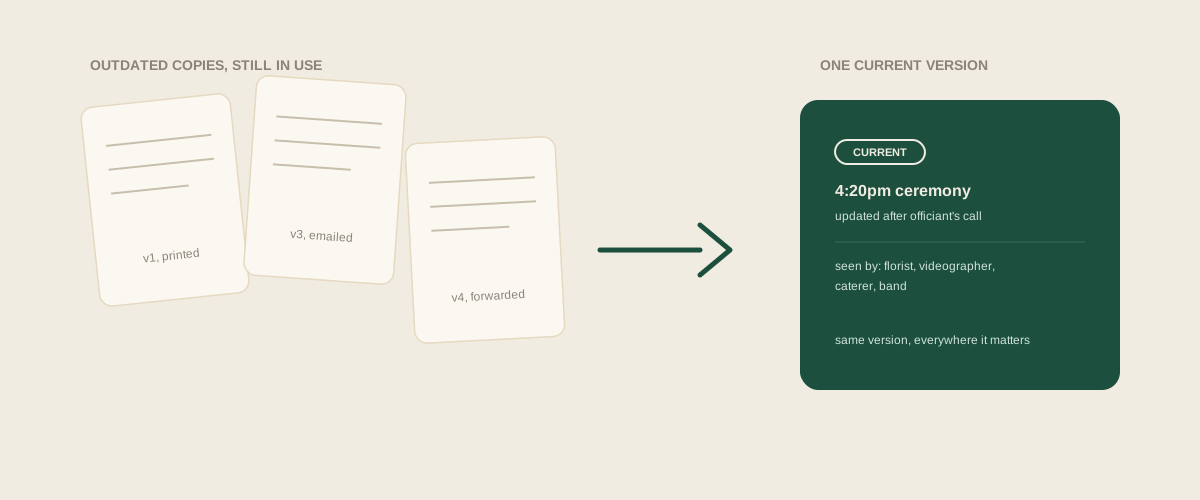
A worked example
Say a timeline goes out in June with a 4pm ceremony. In July, the officiant asks for a 4:20 start to fit their schedule, and the studio updates its own copy and mentions it in a call with the caterer, who updates their internal plan too. The florist and the videographer were not on that call. Both are still holding the June version, since nothing was ever resent to them directly, just discussed with two of the four vendors who needed to know. On the day, the florist's delivery is timed against a ceremony that starts twenty minutes earlier than they planned for, and nobody realizes the florist was never actually told until the flowers arrive at the wrong moment.
Why keeping one master copy is not enough on its own
Most studios do keep a single master timeline file that they consider the real one, updated as changes come in. That solves the problem for the studio's own internal use. It does not solve it for vendors, who are not refreshing that file on their own; they are working from whatever copy landed in their inbox or their hands last, and a master file nobody else can see does nothing to correct a vendor's outdated printout unless someone actively pushes the new version to them and confirms they have actually seen it.
Common mistakes
Sending a revised timeline to whichever vendors are already on the email thread, and forgetting the ones who were looped in earlier and then dropped off. Mentioning a timeline change verbally on a call with one vendor and assuming it will somehow reach the others. Treating a timeline as final once the venue confirms it, when a vendor's own scheduling need, or the couple's own late change, can still shift it again after that point. Never confirming that a vendor actually opened the latest version, so a sent email gets counted as a delivered update even when nobody on the other end has read it yet.
Where to start
The fix is not sending fewer revisions, some of those changes are unavoidable right up until the week of the event. It is making sure every vendor who needs the timeline is attached to the same current version on one shared board, so a change made for the caterer's benefit is visible to the florist and the videographer at the same moment, not something they find out about by comparing notes with another vendor on-site. Forward whatever confirms the change, an email from the officiant, a text from the venue, and the update replaces the old version everywhere it matters instead of sitting as one more revision competing with the last five someone already printed.
Frequently asked questions
How many times does a typical wedding timeline actually change before the event?
It varies, but three to six revisions between initial booking and the week of the wedding is common once every vendor's own scheduling needs and the couple's own late decisions get factored in. Each one is usually minor on its own, which is part of why they are easy to under-communicate.
Which vendors actually need the full timeline versus just their own portion?
Most vendors only care about the window around their own role, a florist needs delivery and ceremony timing, a band needs load-in and reception timing, but giving everyone the full timeline is usually safer than trimming it, since an earlier or later start elsewhere in the day can still shift their own window without them realizing it.
Is a shared link better than sending a new file every time the timeline changes?
It removes the version-mismatch problem as long as vendors are actually checking it rather than relying on a printout from the day they first opened it. Either way, what matters most is confirming a vendor has seen a change, not just that it was made available somewhere.
Whose job is it to make sure every vendor has the current timeline?
Usually whoever owns the master copy, often the lead planner or day-of coordinator, but the actual failure point is rarely about whose job it is and more about changes getting confirmed with only some vendors instead of all of them at once.
Get your studio address, free
Get your studio address
